- 4.0
- Rating
- 1.00M
- Installs
- Free
- Price

 Analysis by App-foxy
I approached Instagram as a social viewing app with one practical question in mind: does moving Reels to a television make watching with other people genuinely better? The answer is yes in the right setting, although the experience depends heavily on whether you want a relaxed shared screen or a full social network in your living room. The app is free, comes from Instagram, and is aimed at Teen users, so it sits between casual entertainment and the broader Instagram community rather than behaving like a traditional streaming service.
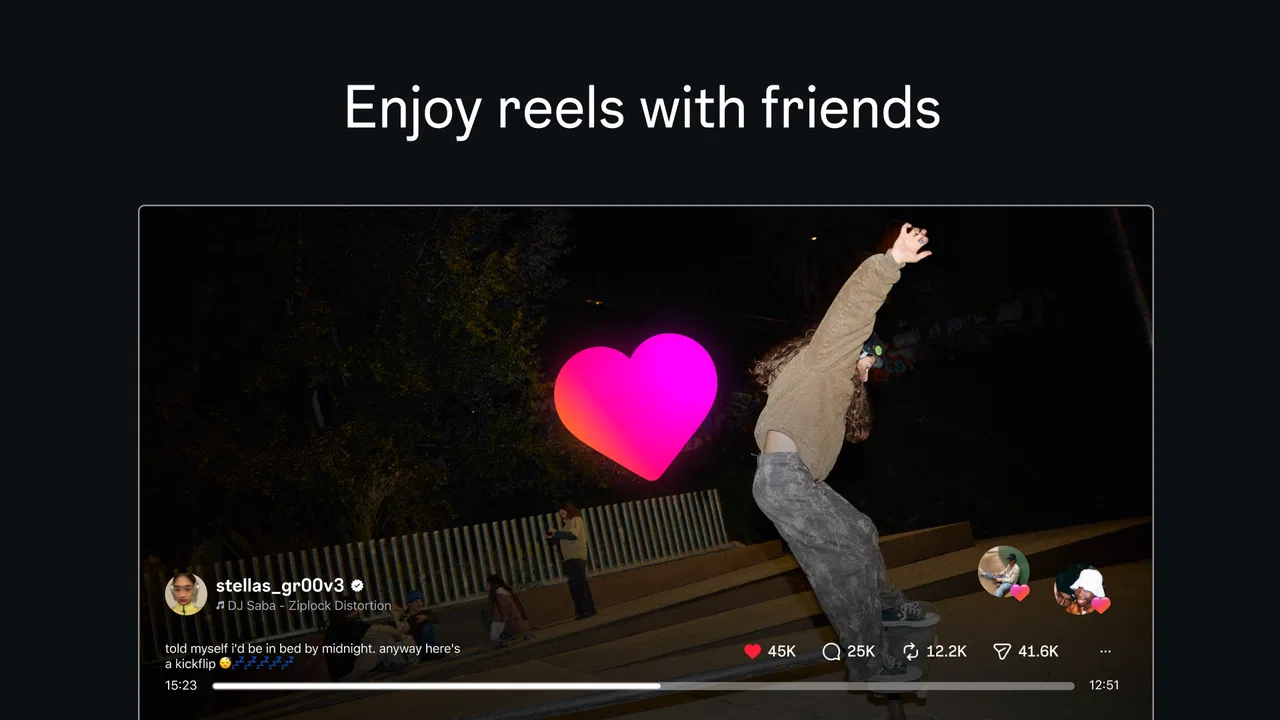
The starting point is familiar. Someone finds a short video on Instagram, wants to show it to a friend or family member, and reaches for a phone. That works, but it makes the audience small and turns the moment into a handoff between one person and a tiny screen. This app’s appeal is that Instagram Reels are presented on TV, giving a group a more natural way to watch creators together. I found that simple change more useful than the store wording might suggest, especially when the goal is conversation rather than solitary scrolling.
From finding a Reel to sharing it on the big screen
I start with the handoff itself: finding a Reel that suits the room, then deciding when it is worth bringing everyone’s attention to the television. I also look at how a little preparation can keep the session moving without turning one person into a full-time host. That makes it easier to judge whether the big-screen format fits your group.
You May Also Like

 Blood Strike: 2.5 Anniversary
Blood Strike’s Loadouts Turn Every Drop Into a Tactical Gamble
A close look at Blood Strike’s custom loadouts: how fast access to signature weapons reshapes its battle royale rhythm, rewards preparation, and narrows the gap between fights.

 Pandora - Music & Podcasts
Pandora’s Music Is Easy to Start, but Harder to Recover
Pandora’s strength is its low-effort path from a seed to a station. Its weak spot is how much confidence it asks you to place in connection, setup, and quiet recovery.

 8 Ball Pool
8 Ball Pool Is Built on Rivalries, Rematches, and Routine
A close look at the rivalries, rematches, shared routines, and unanswered safety questions that turn a quick pool match into a persistent mobile community.

 Samsung Music
Samsung Music’s Quiet Strength Is Playing What You Already Own
Its reach comes less from spectacle than from dependable access to a personal library. That simplicity is both the app’s strongest retention engine and its ceiling.

 AccuWeather: Weather Radar
AccuWeather Review: A Quick, Clear Forecast for Everyday Decisions
For everyday plans, the best forecast is the one you can understand quickly. AccuWeather makes rain timing, radar, and local conditions easy to act on, with a few trade-offs.

 Hill Climb Racing
Why Hill Climb Racing Still Turns Crashes Into One More Run
A tiny car, a bumpy hill and one more upgrade: Hill Climb Racing keeps resurfacing because its simple chaos makes every near-miss feel personal.
More From Our News Desk
View All News


The first step is choosing the right kind of viewing session
Before opening the app, I would decide whether the session is for discovery, sharing, or background entertainment. Those are different habits. If I am alone and trying to catch up quickly, a phone remains more convenient because it is personal, immediate, and easy to carry. If several people are already in the room, the TV format has a clearer advantage: everyone can see the same frame without passing a device around.
This distinction matters because Reels are built around rapid decisions. On a phone, I can swipe away from a clip almost instantly. In a group, that choice becomes social. Someone may want to replay a moment, another person may want to move on, and a third may ask who created it. The larger display improves visibility, but it also makes every navigation decision public. I recommend starting with a loose purpose, such as showing a few creators or collecting funny clips, instead of treating the session like an endless private feed.
Finding something worth showing
The strongest workflow begins before the television is involved. I usually browse on the phone first, where the personal nature of Instagram makes it easier to judge whether a Reel is suitable for the room. A clip that is harmless in a private feed may be awkward in a mixed-age household or among colleagues. Since the content rating is Teen, I would not assume every recommendation fits every audience simply because the app is easy to use.
A useful habit is to pause when a Reel has a clear shared value: a recipe technique, a travel idea, a creative demonstration, a music performance, or a joke that benefits from seeing other people’s reactions. That is more effective than sending every interesting clip to the big screen. The TV works best when the selected video gives people a reason to talk, not merely when it is larger.
Moving from personal browsing to group watching
The handoff from phone to television is the central moment of the experience. The phone is where discovery feels fast and private; the TV is where the result becomes communal. I found it helpful to make that handoff deliberately rather than constantly switching between the two. Find a small group of clips first, then begin the shared session. This reduces the stop-start feeling that can make social viewing tiring.
There is also a social handoff between the person holding the phone and everyone else. That person becomes the informal host, deciding what appears next. In a relaxed group, this is enjoyable. In a larger group, it can become a bottleneck. I would rotate control or agree on a simple rule, such as letting each person choose a few clips, so the experience does not become one person’s private feed projected onto a wall.
Why the larger screen changes the conversation
On a phone, a Reel often ends with another swipe. On TV, the pause after a clip feels more visible, and that changes how people respond. Viewers can notice details together, compare reactions, and ask about the creator without leaning over someone’s shoulder. This makes the app particularly suitable for informal gatherings where people want short bursts of entertainment rather than a long movie.
The trade-off is that scale amplifies both good and bad presentation choices. A visually clear Reel can become a shared highlight, while a clip with tiny text, hurried captions, or a confusing opening may be harder to follow from across the room. I would sit close enough to read important on-screen information and avoid assuming that every Reel designed for a phone translates perfectly to a television.
Using creators as the organizing principle
The store summary points toward watching favorite creators together, and that is a more reliable workflow than opening the app without a plan. A creator-based session gives the group continuity: people understand why the next clip is appearing, and the viewing feels less random. It also helps when one person wants to introduce a creator to the rest of the room.
For a practical evening, I might begin with a creator known for short cooking demonstrations, then move to travel clips, and finish with lighter entertainment. The point is not to create a formal playlist but to give the session a shape. That small amount of preparation prevents the familiar problem of spending more time searching than watching.
What happens when the phone and TV serve different roles
I would not treat the television version as a replacement for every part of Instagram. The phone remains the better place for private browsing, writing messages, examining a profile, or deciding whether a clip deserves to be shared. The TV is the better endpoint when the intended outcome is a common viewing moment.
This division of labor is one of the app’s most important practical insights. Trying to do everything on the large screen can make the experience feel slower and less personal, while trying to share everything from a phone keeps the audience constrained. Use the phone as the filter and the TV as the stage. That simple separation makes the workflow easier to control.
Where the handoff becomes awkward
The biggest friction is not the idea of Reels on TV; it is the transition between individual and group behavior. A person may be comfortable scrolling privately but less comfortable becoming responsible for the room’s entertainment. The app does not remove that social pressure. It makes the chosen content more visible, which means the host needs to think about pacing, suitability, and whether people actually want to keep watching.
Another issue is attention. Short videos encourage constant novelty, while group viewing benefits from occasional discussion. If the person controlling the session moves too quickly, everyone becomes passive. If the pace is too slow, the energy drops. I had better results when I allowed a clip to finish, left a moment for reactions, and only then moved on. That sounds minor, but it changes the app from a scrolling feed into a shared activity.
How it compares with the usual alternatives
Compared with watching Reels directly on a phone, the television experience wins on visibility and participation. It is easier for several people to follow the same video, and nobody has to hold a device at an uncomfortable angle. The phone still wins on speed, privacy, and precise control, so I would choose it for solo use or quick discovery.
Compared with a conventional streaming app, Instagram is more spontaneous and creator-led. A streaming service is usually better when the group wants a planned, uninterrupted program with a predictable length. Reels are better when viewers want variety, quick surprises, and the ability to move between creators. The choice depends on whether the desired outcome is a shared stream of short discoveries or a settled piece of entertainment.
Compared with sending individual clips through a messaging app, the TV workflow creates a stronger shared endpoint. Messaging is better for asynchronous recommendations: I can send something and let another person watch later. The television is better when everyone is present now. That difference helps explain why this app is not simply a larger version of the phone experience; it supports a different social situation.
Who benefits most from this setup
I think the app is especially useful for households, roommates, and small groups of friends who already exchange Reels and want to make those recommendations more social. It can also work for someone introducing a favorite creator to people who do not normally use Instagram. The shared screen lowers the need for everyone to have an account or understand the whole platform before joining the moment as a viewer.
It is less suitable for people who dislike algorithmic discovery, want uninterrupted long-form viewing, or prefer complete control over what appears next. Someone looking for a quiet personal feed may gain little from the TV focus. Likewise, if a group has very different tastes, the host role can become more work than entertainment.
Practical ways to avoid a disappointing session
My first tip is to curate lightly. Choose a theme or a few creators before inviting everyone to watch. This keeps the opening minutes focused and gives the group a shared reference point. My second tip is to check captions and visual details from the intended seating distance. A Reel that works perfectly on a phone may lose its useful information when people are farther away.
My third tip is to treat control as a group resource. If one person always chooses, the session can feel like a presentation. Letting people take turns or suggest the next creator makes the outcome feel collaborative. My fourth tip is to stop while the group is still enjoying it. Reels can continue indefinitely, but a successful shared session often ends with people remembering a handful of clips rather than feeling trapped in an endless feed.
Performance expectations and the app’s place in the catalog
The current version is 45.0.0.7.106, and the app supports a minimum operating system of 7.1. That makes it relevant to users with older compatible devices, although the quality of any television-based experience will still depend on the equipment and setup being used. I would keep the app updated and make sure the phone is ready before starting a group session, because technical pauses are more noticeable when several people are waiting.
Instagram has an average rating of 3.6 from around 460 ratings, with roughly 53 written reviews, and it has passed one million installs. Those figures suggest a product with meaningful reach but a mixed reception. I would read that combination as a reminder that the concept is appealing while the broader Instagram experience can vary by user, device, and expectations. The app is free, which makes trying it low-risk, but free access does not guarantee that every group will find the social workflow comfortable.
The result: a better shared endpoint, not a complete living-room replacement
When the workflow goes well, the outcome is simple: someone discovers a Reel, filters it for the audience, moves it to the television, and gives the group something to react to together. The larger screen removes the physical barrier of a phone and makes creator content feel more like a shared recommendation than a private scroll. That is the app’s clearest strength.
I would recommend it to a friend who already enjoys Instagram and wants an easy way to turn favorite Reels into group viewing. I would not recommend choosing it over a conventional streaming service for a planned movie night, or over the phone for private browsing. The best use is a short, flexible social session where discovery and conversation matter more than a fixed program.
Where the flow breaks and my final judgment
The experience breaks when browsing has no purpose, when the host moves too quickly, or when the room expects a polished television program instead of unpredictable short-form posts. It can also lose its value if nobody wants to share control. These are not reasons to dismiss the app, but they are important boundaries. The TV format improves the audience’s view; it does not automatically improve the content selection or the group dynamic.
My final judgment is favorable but specific. This is a useful social extension for Instagram Reels, especially when friends or family are already together and someone wants to show a creator without passing a phone around. It succeeds by changing the endpoint of discovery from one person’s hand to a shared screen. Just remember that the phone remains the smarter tool for filtering and personal browsing, while the television is where the payoff happens.
For me, that balance makes the app worth trying. It does not need to replace every other way of watching video. It only needs to make the right moment easier: a room full of people, a few creators worth introducing, and a screen large enough for everyone to join in.
FAQs for Instagram
01What are the main features of Instagram?
Instagram is a social media platform offering features like photo and video sharing, Stories, Direct Messaging, and IGTV for longer videos. Users can apply filters, tag locations, and use hashtags to reach a broader audience. The app also supports live streaming and has shopping features for businesses.
02Is Instagram free to use, and are there any in-app purchases?
Yes, Instagram is free to download and use. However, it offers in-app purchases such as promotional tools for businesses or creators who want to boost their posts or profiles. These promotions can help increase visibility and engagement with a targeted audience.
03How does Instagram handle user privacy and data security?
Instagram provides several privacy settings, allowing users to control who sees their content. Accounts can be set to private, restricting visibility to approved followers. Instagram also offers tools to manage data sharing and tracking, and users can report or block inappropriate content easily. Regular updates enhance security measures.
04What are the pros and cons of using Instagram?
Pros include a user-friendly interface, vast creative tools, and a large, engaged community. It's ideal for networking and brand promotion. However, cons involve potential addiction, privacy concerns, and the pressure of maintaining a curated online presence which can impact mental health for some users.
05Can Instagram be used for business purposes?
Yes, Instagram is a powerful tool for businesses. It offers features like Instagram Business Profiles, Instagram Shopping, and analytics tools to track engagement. Businesses can run ads, create sponsored posts, and use Stories to connect with customers, making it essential for digital marketing strategies.
Pros
- User-friendly interface enhances navigation.
- Extensive filters for creative photo editing.
- Strong community engagement features.
- Regular updates with new tools.
- Seamless integration with other social media.
Cons
- Algorithm changes affect post visibility.
- Heavy data usage can impact mobile plans.
- Privacy concerns with data sharing.
- Ad frequency can be distracting.
- Limited options for text-only posts.

Gallery